Cinematic AI Video Prompt - "Stop Being Distracted"

The short answer: our 28-second film "Stop Being Distracted" comes from one cinematic AI video prompt with seven parts: a format line, a character lock, the world, a scale rule, nine timed shots, an audio track and a negative list. We made a character sheet and a storyboard in Seedream 5 Pro, attached both, and generated the film in Seedance 2.5 on Magnific. All three prompts are below.
Most AI videos fall apart after the first cut. The face changes between shots, the glasses disappear, the character suddenly looks taller than the room, and the story you had in your head turns into four unrelated clips. A good cinematic AI video prompt fixes most of that before you generate a single frame.
How the cinematic AI video prompt is built
The prompt reads like a brief you would give a film crew. Each part answers one question the model would otherwise guess at, and every guess is a chance for the video to drift.
1. Format line
The first line sets the length, aspect ratio, frame rate, shot style and colour grade, and tells the model to follow the attached reference images.
Why it works: the model knows the shape of the whole film before it reads a single shot, so the look stays the same from start to end.
2. Character lock
One paragraph describes the woman down to the glasses, the bangle, the shirt and the knee pads, and states that the face never changes.
Why it works: repeating fixed details is what stops the face and outfit from changing between cuts. Small props like the glasses are the first thing models drop, so the prompt says they are always on.
3. World
This sets the place and the visual rules: a low tunnel seen in cross-section, a wall of diamonds she never sees, warm lamp light for working and cold phone light for distraction.
Why it works: the two light colours carry the story without any text or dialogue. The viewer reads warm as effort and blue as scrolling.
4. Scale rule
A separate paragraph keeps her kneeling and fully inside the tunnel in every wide shot, with earth visible above her head.
Why it works: without it, models make the character too big for the space. Writing the rule once, apart from the shots, means every wide shot inherits it.
5. Shot list
Nine shots, each with a time range, a camera position and one clear action, from digging to scrolling to the diamond falling to the breakthrough.
Why it works: timing every shot gives the model a rhythm, and one action per shot keeps each moment readable.
6. Audio
One line describes the sound in the same order as the story: pickaxe, notification pings, near silence, a single diamond clink, then the music peaks.
Why it works: sound that follows the story makes the turn in the film land, and it tells the model how fast each moment should feel.
7. Negative list
The prompt ends with everything that must not happen: the head crossing the ceiling, the glasses coming off, extra fingers, misspelled text.
Why it works: each item is a mistake we saw in earlier tries. Naming it directly is the fastest way to stop it repeating.
What is a negative prompt? It is a list of things you do not want in the result. The model treats it as a set of mistakes to avoid, which is often easier than describing the right thing in more detail.
The full prompt
Copy it as it is first, then change the character, the world and the shots to fit your idea. Keep the seven-part structure.
A 28-second photorealistic cinematic short film, 4:3, 24fps, multi-shot with hard cuts, warm amber vs cold blue colour grade, shallow depth of field, subtle film grain. Use the reference images: the woman from the character sheet and the shot layout from the storyboard.
CHARACTER (identical in every shot, face never changes): young Indian woman, early-to-mid 20s, round soft face, warm medium-brown skin, black thin rectangular eyeglasses ALWAYS ON, very long voluminous wavy dark-brown hair worn loose, small gold bangle on her right wrist. Faded khaki long-sleeve work shirt with sleeves rolled up, white tank top underneath, khaki trousers with white paint splatter, brown leather tool belt, dark knee pads, dusty hands. Both eyes always look the same way and stay visible behind the glasses, which catch natural reflections.
WORLD: a narrow, low underground tunnel shown in cross-section, like a rectangular hole cut into the earth with a solid earth ceiling above it, earthy brown walls. The tunnel is a tight crawl-space and is shorter than her standing height, so she can never stand upright inside it. A massive wall of giant raw clear diamonds sits just beyond the tunnel end, along the right side and above the tunnel ceiling. She never sees it. Warm amber work-lamp = working, cold blue phone light = distracted.
SCALE RULE (all wide cross-section shots): her whole body stays completely INSIDE the tunnel opening at all times. Her head, hair, arms and the raised pickaxe always stay below the tunnel ceiling, with clear visible earth between the top of her head and the upper edge of the hole. She works kneeling or crouched and bent forward, never standing. She fills about 50-60% of the tunnel height. Nothing she wears or holds passes the tunnel walls or ceiling.
SHOT 1 (0-6s) Locked-off wide cross-section: kneeling and bent forward inside the low tunnel, she swings a short pickaxe in tight strokes into the end wall under the warm lamp, dust puffing, sweat on her face. Her head stays well below the tunnel ceiling. The diamonds glint inches beyond her.
SHOT 2 (6-10.5s) Medium side, slight handheld: exhausted, she sits back against the tunnel wall, wipes her forehead with her forearm, pulls out her phone and starts scrolling, and a slow smile spreads.
SHOT 3 (10.5-13s) Medium frontal, low angle: seated, she holds the phone in both hands, face lit from below, grinning, hooked. A glowing screen rectangle reflects on both lenses. Slow push-in.
SHOT 4 (13-17s) Extreme close-up of her eyes behind the glasses, slow push-in: cold blue light, colourful reel thumbnails scroll across both lenses and flicker in her pupils, an unblinking trance.
SHOT 5 (17-18.5s) Same wide cross-section as Shot 1: the lamp is OFF and the tunnel is dark. She lies flat on the tunnel floor scrolling, fully inside the tunnel, lit only by the blue phone glow. The pickaxe lies beside her. One small diamond falls from the tunnel ceiling beside her with a soft clink.
SHOT 6 (18.5-21s) Medium side: seated, phone in one hand, she picks up the diamond and holds it to her face. Its sparkle reflects on her lens, and her expression turns to wide-eyed realisation.
SHOT 7 (21-24s) Wide cross-section: the lamp flicks back on. She sets the phone face-up on the tunnel floor, grabs the pickaxe and gets back onto her knees, crouched forward and determined, her head still well below the tunnel ceiling.
SHOT 8 (24-25.5s) Top-down insert: the phone lies on brown dirt, its white screen reading "STOP BEING DISTRACTED." in bold black text, a cut diamond beside it. No person in frame.
SHOT 9 (25.5-28s) Wide cross-section: still kneeling inside the tunnel, she swings hard and breaks through the end wall, and a huge wave of glittering diamonds bursts into the tunnel past her. Her body stays fully inside the tunnel. Cut to black.
AUDIO: pickaxe strikes and heavy breathing → soft notification pings and a dreamy music bed → near-silence and one diamond clink → the music rises and the lamp clicks on → a beat of silence → a big crack, a cascade of crystals and the music at its peak. No dialogue, no subtitles.
NEGATIVE: head crossing the tunnel ceiling, character taller than the tunnel, body outside the hole, standing upright in the tunnel, pickaxe through the ceiling, hair over the tunnel edge, wrong scale, giant character, different face, face morphing, glasses removed, ponytail, outfit change, cross-eyed, eyes hidden by glare, distorted hands, extra fingers, flicker, misspelled text, cartoon, watermark.
How to make your own version
Step 1: Make a character sheet
We made ours in Seedream 5 Pro on Magnific: three clear photos of the person plus one outfit reference went in, and a front, side and back turnaround with close-ups came out. This becomes the reference for the face and outfit.
How to use it: attach it as the first reference image and keep the character paragraph in the prompt matching it word for word.
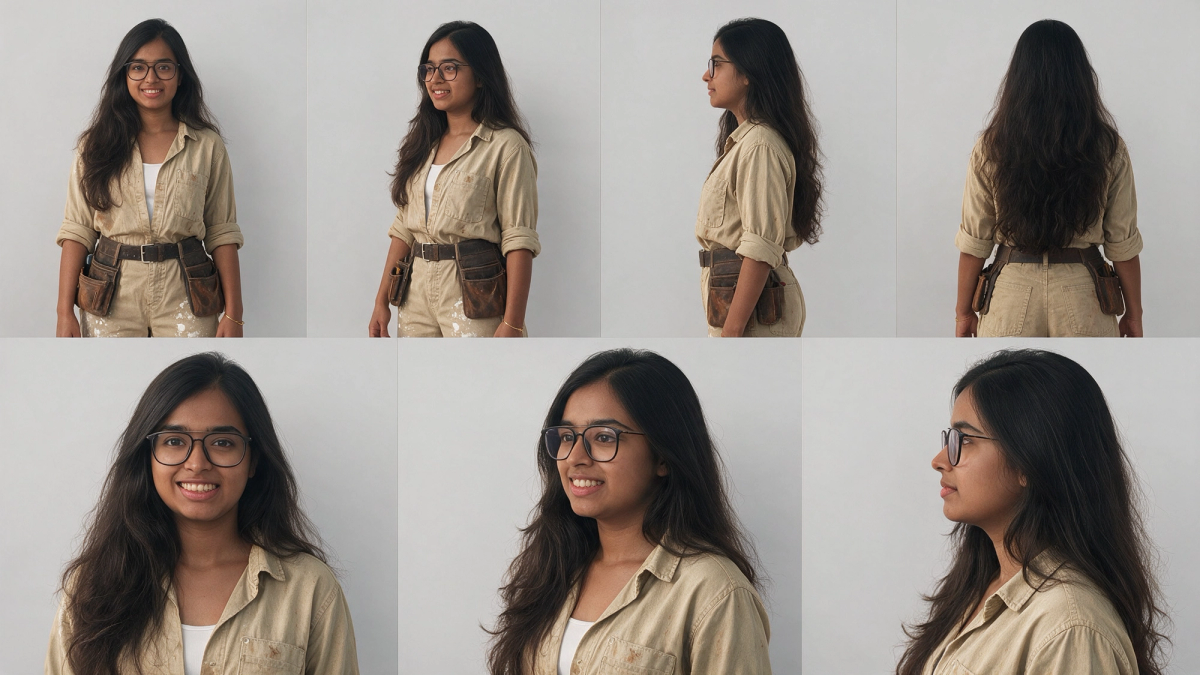
The character sheet prompt we used (in Seedream 5 Pro, with three photos of the person and one outfit photo attached):
Create a character reference sheet.
IDENTITY: Images 1, 2 and 3 are the SAME real woman. Copy her face exactly as it appears in these photos: same face shape, eyes, nose, lips, smile, teeth, skin tone, eyebrows and proportions. Do NOT beautify, slim, age, lighten skin or change her features. Her face must look identical in every panel.
- Young Indian woman, early-to-mid 20s, round soft face, warm medium-brown skin
- Black thin rectangular eyeglasses (always on)
- Very long, voluminous, wavy dark-brown hair, middle parting, worn loose past the waist
- Small gold bangle on her right wrist
OUTFIT: Image 4 is for clothing ONLY. Ignore that model's face, hair and body entirely.
- Faded khaki/beige long-sleeve button-up work shirt, sleeves rolled to forearms, open collar with white tank top underneath, light brown dirt stains
- Matching khaki work trousers with white paint splatter
- Dark brown leather belt with brown leather tool pouches on both hips
- Dark worn knee pads
LAYOUT: plain light-grey studio background, soft even lighting, same scale in every view:
Top row: full-body turnaround, standing relaxed with arms at her sides: front, 3/4 front, side profile, back.
Bottom row: head-and-shoulders close-ups: front, 3/4, profile, all with the same face as the reference photos.
STYLE: photorealistic, natural skin texture, true-to-life, clean reference sheet with thin divider lines.
Negative prompt: different face, face from image 4, ponytail, no glasses, lighter skin, slimmer face, beautified features, changed nose, changed smile, cartoon, inconsistent identity across panels
Step 2: Make a storyboard
We made this in Seedream 5 Pro as well, by giving it a rough storyboard and the character sheet and asking it to redraw every panel with our character. Get the wide shot right first, since that is where scale goes wrong. Small text glitches in the captions do not matter; the video model only reads the framing.
How to use it: attach it as the second reference image. The prompt already tells the model to take the shot layout from it.
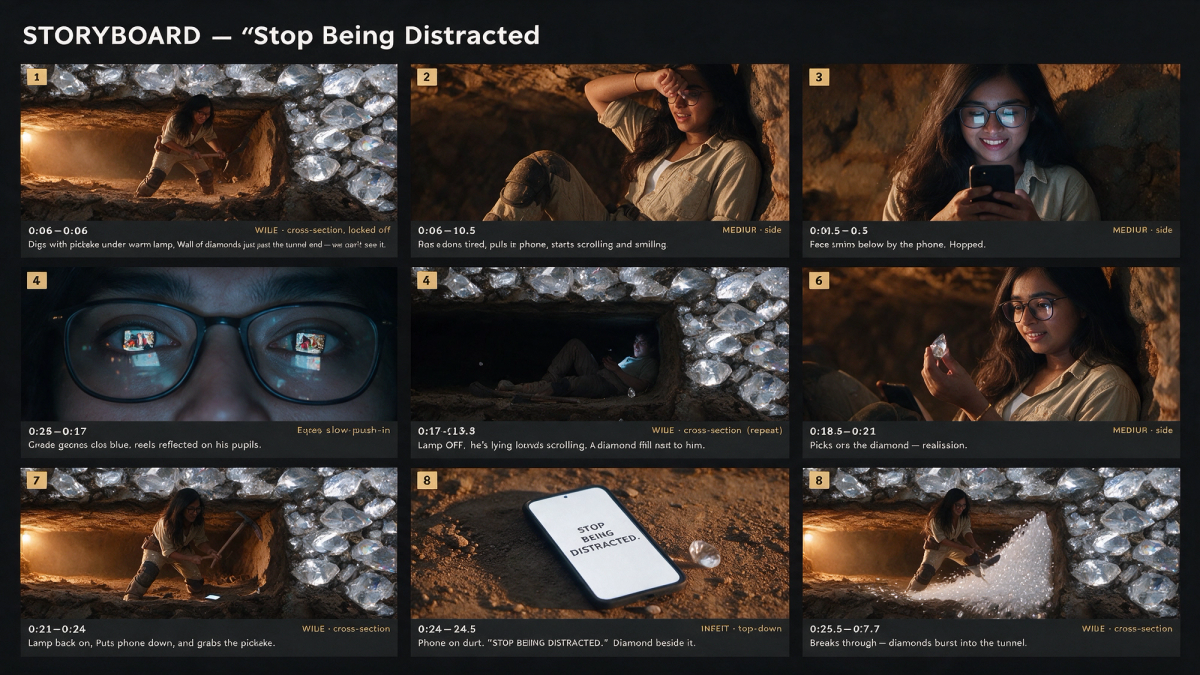
The storyboard prompt we used (in Seedream 5 Pro, with a rough storyboard as Image 1 and the character sheet as Image 2):
Recreate the storyboard in @img1 as a new 3x3 photorealistic storyboard grid. Replace the man in every panel with the woman from @img2. Keep each panel's composition, camera angle, framing, lighting and action the same as Image 2.
CHARACTER (Image 1, identical in every panel): Young Indian woman, early-to-mid 20s, round soft face, warm medium-brown skin, black thin rectangular eyeglasses ALWAYS ON in every panel, very long voluminous wavy dark-brown hair worn loose, small gold bangle on her right wrist. Copy her face exactly from Image 1. Do not beautify, slim or change her features. Both eyes always look in the same direction, and her eyes are visible behind the glasses without distortion. The glasses lenses pick up natural reflections from whatever light is in front of her.
Outfit: faded khaki long-sleeve work shirt with sleeves rolled up, white tank top underneath, khaki work trousers with white paint splatter, brown leather belt with tool pouches, dark worn knee pads, dust on her hands and clothes.
WORLD: A narrow underground tunnel shown in cross-section, with earthy brown walls. Just beyond the end of the tunnel, along the right side and the roof of the frame, is a massive wall of giant raw clear diamonds that she cannot see. Warm amber work-lamp light = working. Cold blue phone-screen light = distracted.
PANELS (left to right, top to bottom):
1. 0:00-0:06 | WIDE cross-section, locked off: she swings a pickaxe under the warm lamp, sweaty and focused. The diamond wall sits inches past the tunnel end.
2. 0:06-0:10.5 | MEDIUM side: she slumps against the tunnel wall, wipes sweat off her forehead with her forearm, tired.
3. 0:10.5-0:13 | MEDIUM frontal, low angle: she sits holding her phone in both hands, face lit from below by the screen, smiling, hooked. The bright phone screen reflects as a small glowing rectangle on both glasses lenses.
4. 0:13-0:17 | EXTREME CLOSE-UP on her eyes behind the glasses: cold blue light. Colourful reel thumbnails reflect clearly on both glasses lenses AND tiny ones in both pupils. Her eyes are visible through the reflections, in a trance-like stare.
5. 0:17-0:18.5 | WIDE cross-section, same frame as panel 1: the lamp is OFF and the tunnel is dark. She lies back scrolling, lit only by her phone, with the screen glow visible on her glasses. The pickaxe lies on the ground. One small diamond falls from the roof beside her.
6. 0:18.5-0:21 | MEDIUM side: phone still in one hand, she holds up the fallen diamond in the other. The diamond's sparkle reflects on her glasses lens, and her expression changes to realisation.
7. 0:21-0:24 | WIDE cross-section: the lamp is back on, she has put the phone down on the floor and is getting up with the pickaxe in her hands.
8. 0:24-0:25.5 | INSERT top-down: a phone lying on brown dirt, its white screen reading "STOP BEING DISTRACTED." in bold black text, a cut diamond beside it. No person in frame.
9. 0:25.5-0:27.7 | WIDE cross-section: she swings and breaks through the end wall, and diamonds burst into the tunnel in a glittering wave.
LAYOUT: Dark charcoal background. Title at the top: "STORYBOARD: Stop Being Distracted". Each panel is numbered in a gold box at its top-left, with a dark caption strip underneath showing the timecode on the left, the shot type in gold on the right, and a one-line action description, as in Image 2.
STYLE: Photorealistic cinematic film stills, 4:3 panels, warm amber vs cold blue colour grade, realistic reflections on the eyeglass lenses, shallow depth of field, consistent character in every panel.
Negative prompt: man, male character, different face, glasses removed, no glasses, ponytail, inconsistent outfit, cross-eyed, eyes looking different directions, distorted eyes behind glasses, reflection replacing the eyes, eyes hidden by glare, extra limbs, distorted hands, misspelled text, cartoon, watermark
Step 3: Rewrite the story, keep the structure
Swap the tunnel and diamonds for your own idea, then rewrite the nine shots with a time range, a camera position and one action each.
How to use it: keep the total time the same as the shot timings add up to, and keep a scale rule if your character is in a tight space.
Step 4: Generate and fix with the negative list
We ran it in Seedance 2.5 on Magnific, with the character sheet and the storyboard attached as references. When something goes wrong, add it to the negative list and run it again.
How to use it: change one thing per run so you can see what fixed it.
Common mistakes when writing cinematic AI video prompts in 2026
- Describing the character differently in different shots, which is the main cause of face changes.
- Leaving out timings, so the model rushes some shots and drags others.
- Putting several actions in one shot, which makes each one blurry and hard to read.
- Skipping reference images and expecting the text alone to hold the character steady.
- Asking for text on screen without spelling it out exactly, which leads to misspelled words.
FAQ
Which AI video model can I use this prompt with?
We used Seedance 2.5 on Magnific. Any AI video model that accepts reference images and longer, multi-shot prompts will understand the structure, but results vary by model, so expect to adjust the scale rule and the negative list for the one you use.
How do I keep the same face in every shot of an AI video?
Use a character sheet as a reference image, describe the character once in fixed detail, and state that the face never changes. Repeat the most fragile details, like glasses or jewellery, in the negative list too.
Why does my AI character look too big for the room?
Models do not judge scale well on their own. Add a separate scale rule that says where the character must stay in the frame and what must be visible above their head, as this prompt does.
Can I use this prompt for a brand ad?
Yes. Keep the seven-part structure and replace the story with your product moment. The character lock and the shot timings matter just as much for ads as for short films.
In short: a cinematic AI video prompt works when it reads like a crew brief. Lock the format, the character and the world, add a scale rule, time every shot, describe the sound, and list the mistakes to avoid. Attach a character sheet and a storyboard, copy the prompt above, and change the story while keeping the structure.
Quick summary · key points
- ✓How the cinematic AI video prompt is built
- ✓1. Format line
- ✓2. Character lock
- ✓3. World
- ✓4. Scale rule
- ✓5. Shot list