AI Art Styles: 100 Style Prompts to Restyle Any Photo
This post gives 100 AI style prompts that re-render one photo into a new medium, such as a sumi-e ink wash, a 1947 pulp cover, a cross-stitch, an X-ray or a Lego build. One master edit prompt keeps the composition locked while the style changes. Every prompt is written to be pasted directly.
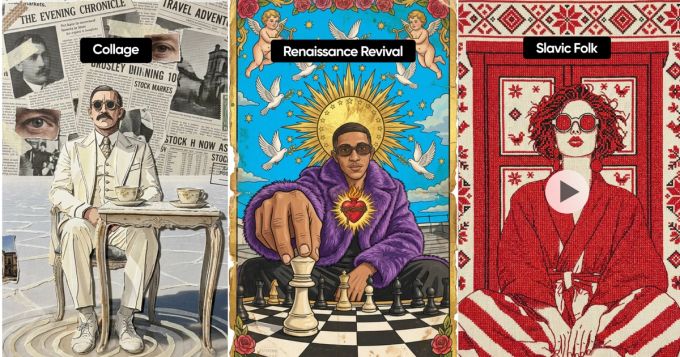
Most people use AI image tools to generate something new. The more interesting move is the opposite: take one photo you already have and re-render it into a medium it has no business being in. A product shot as a Slavic cross-stitch. A pet as a Byzantine icon. A selfie as a thermal heat-map poster.
The distance between the subject and the style is where the whole effect lives. A landscape rendered as a watercolour is pleasant. A landscape rendered as a corrupted video file is a scroll-stopper.
Below are 100 style prompts, written to be pasted directly. The first nine are the ones from our reel, unchanged. The other 91 go a lot further.
The one rule that makes all 100 of these work
Start from ONE photo — generate it or upload your own. Then reuse that same image and ask for a restyle using the image-edit path, not a fresh generation. The edit keeps the composition, so your before and after line up perfectly. A fresh generation gives you a different picture that happens to share a subject, which kills the whole before/after payoff.
Paste this wrapper first, every time:
Take this exact photo and completely re-render it in the style below. Keep the composition, pose, scale and position identical so it lines up with the original.
[paste one style prompt from below]
How to actually use this list
- Swap the subject freely. Every prompt is written subject-agnostic — a pet, a product, a selfie, a building, a landscape all work.
- Keep the closing line. Most prompts end with "Nothing photographic left." That sentence is doing real work — it stops the model from laying a filter over the photo instead of rebuilding it.
- Two sections change that ending on purpose. Craft and object styles end with "Every part made of wool / clay / glass" because the output is a real object being photographed. Film and camera processes drop the line entirely, because the whole point is that it stays a photograph.
- Stack two if you're brave. Pick a medium from one section and an era from another. Results get unpredictable, which is sometimes exactly what you want.
- Run the same photo through five prompts and post the grid. That's the format that performs, not any single output.
Part 1: The nine from the reel
These are the exact nine shown in the video, word for word.
1. Lowbrow Neon
Completely re-render this entire image as a lowbrow pop-surrealist illustration: redraw the subject in bold heavy black comic linework over super-saturated flat neon colors (electric teal, hot magenta, acid green, orange), every texture drawn as ink strokes, flat printed color with no photographic shading. Scatter 1980s Memphis confetti marks (lines, dots, zigzags) on a flat color ground. Keep the exact composition, pose, scale and position. Nothing photographic left.
2. Renaissance Revival Santo
Completely repaint this entire image as a weathered vintage devotional saint holy-card, an aged Mexican santo prayer-card in brilliant saturated poster color. Render the subject as a flat matte painted illustration with hand-drawn outlines and no photographic skin. Add a huge gold sunburst halo, a flaming Sacred Heart, doves, gold stars, cherubs and an ornate gold-leaf rose border on an electric sky-blue ground. Age the whole card: crumple creases, torn edges, foxing and water stains, so it reads as one old printed paper card. Keep the pose, scale and position. Nothing photographic left.
3. Sumi-e Ink Wash
Completely repaint this entire image as a fine-art sumi-e ink-wash painting on rice paper: re-render the subject in gestural black sumi brush strokes with visible bristle drag and ink bleed, graded ink wash from dense black to pale gray, splattered ink flecks, a few bold calligraphic sweeps, soft ink-mist background and large areas of empty rice-paper space, with a small vermilion-red seal stamp. Keep the exact composition, pose, scale and position. Monochrome, nothing photographic left.
4. Paper Collage
Completely re-render this entire image as a handmade mixed-media paper collage: rebuild the subject from flat torn-paper and cut-paper shapes with rough torn edges and black marker linework, then layer a dense collage around it, overlapping torn newspaper and magazine clippings with real body text and halftone photos, strips of masking and washi tape at angles, small cut-out photo fragments, a postage stamp and rubber-stamp marks, and tiny handwritten margin notes, all with real drop shadows between the layers. Keep the subject's composition, pose, scale and position. Handmade paper, nothing flat-digital left.
5. Thermal Heat-Map
Completely re-render this entire image as a graphic thermal-heatmap poster print, a designed piece of poster art (not a camera photo): posterize everything into flat banded thermal-gradient fields with hard contour edges, white-hot core through yellow, orange, magenta and violet down into deep blue-black, flat printed poster ink with paper grain, and small crisp monospace type in the corners. Keep the exact composition, pose, scale and position. Nothing photographic left.
6. Slavic Cross-Stitch
Completely re-render this entire image as a traditional Slavic folk cross-stitch embroidery: render every element as individual red cross-stitch thread stitches on cream woven linen, with geometric stitched folk-ornament borders and small stitched flower, star and diamond motifs filling the space, visible linen weave and raised thread texture. Strictly red thread on cream with small black accents. Keep the composition, pose, scale and position. Nothing photographic left.
7. 80s Memphis Graphic
Completely re-render this entire image as an 80s Memphis-Milano graphic poster: reduce the subject to a bold solid black silhouette with a hard flat edge, surrounded by 1980s new-wave graphic elements (loose squiggles, geometric confetti triangles, dots and zigzags, a bold hand-brushed script word, halftone dot fields), palette hot pink, acid green, cyan and black on warm cream, flat printed ink. Keep the pose, scale and position. Nothing photographic left.
8. Pastel Southwestern
Completely re-render this entire image as a bold flat geometric folk-art screen-print in a pastel southwestern style: reduce everything to clean flat geometric shapes and symmetric folk motifs (radiating sun-rays, quilt diamonds, tulips, stars, small birds), palette coral red, mustard yellow, teal and blush pink on warm cream, flat screen-print texture with paper grain and no photographic gradients. Keep the main subject centered in the same composition, scale and position. Nothing photographic left.
9. 1947 Pulp Cover
Completely repaint this entire image as an authentic hand-painted 1947 pulp adventure magazine cover: render the subject as a fully painted heroic figure in bold gouache and oil with visible brushstrokes and canvas weave, dramatic painted light. Add a bold vintage masthead title across the top, a couple of small red cover blurbs, and a price and date in a corner. Saturated aged print colors, coarse halftone, aged pulp paper with foxing and creased edges. Keep the composition, pose, scale and position. Every part painted, nothing photographic left.
Part 2: Painted and fine art (10–24)
The safest section, and the one where the model has the most reference to draw on. Good starting point if you've never done this before.
10. Impasto Oil
Completely repaint this entire image as a thick impasto oil painting on stretched canvas: rebuild every form from loaded palette-knife slabs and heavy brush strokes with visible ridges, raking side-light catching the paint texture, broken colour with warm and cool notes sitting side by side instead of blended, canvas weave showing through the thin passages, a few bare-canvas gaps at the edges. Keep the exact composition, pose, scale and position. Nothing photographic left.
11. Watercolour Bleed
Completely repaint this entire image as a loose wet-on-wet watercolour on cold-press paper: re-render the subject in transparent washes that bloom and bleed into each other, hard edges only where a wash dried, cauliflower backruns, granulating pigment settling into the paper tooth, a few spatters and drips running down, and large areas of untouched white paper. Keep the composition, pose, scale and position. Nothing photographic left.
12. Gouache Storybook
Completely re-render this entire image as a mid-century children's-book gouache illustration: flat matte opaque colour in a limited palette of dusty orange, teal, mustard and off-white, simplified shapes with slightly wobbly hand-painted edges, visible dry-brush texture, one colour channel printed slightly out of register, on aged cream paper stock. Keep the composition, pose, scale and position. Nothing photographic left.
13. Baroque Chiaroscuro
Completely repaint this entire image as a 17th-century baroque oil painting in dramatic chiaroscuro: one hard raking light from the upper left carving the subject out of near-total darkness, deep umber shadows swallowing the background, warm tones glazed in thin translucent layers, aged varnish yellowing the whole surface and fine craquelure across the paint. Keep the composition, pose, scale and position. Nothing photographic left.
14. Dutch Golden Age Still Life
Completely repaint this entire image as a Dutch Golden Age still-life oil painting: dark olive-brown ground, a single soft window light from the left, every surface rendered with obsessive painted detail and sharp specular highlights, a heavy draped cloth and a half-peeled lemon tucked into the arrangement, aged varnish and craquelure. Keep the subject in the same composition, scale and position. Nothing photographic left.
15. Ukiyo-e Woodblock
Completely re-render this entire image as a Japanese ukiyo-e woodblock print: flat unshaded colour areas bounded by carved keyblock outlines of varying weight, a bokashi gradient across the sky, visible woodgrain in the flat fields, slight block misregistration, a stylised wave or cloud motif, mulberry paper texture, and a red seal with a vertical cartouche. Keep the composition, pose, scale and position. Nothing photographic left.
16. Art Nouveau Panel
Completely re-render this entire image as an Art Nouveau decorative panel lithograph: bold sinuous whiplash outlines, flat muted colour in sage, dusty rose, cream and gold, an ornate circular mosaic halo behind the subject, stylised lilies and trailing vines filling the negative space, a decorative border of geometric roundels, on aged litho paper. Keep the pose, scale and position. Nothing photographic left.
17. Byzantine Gold Icon
Completely repaint this entire image as a Byzantine devotional icon on a wooden panel: flat frontal stylised rendering with elongated forms, dark olive underpainting beneath warm ochre highlights laid in fine parallel strokes, an incised gold-leaf ground burnished and punched with a halo, no perspective and no cast shadows, cracked gesso and worn gilding at the panel edges. Keep the pose, scale and position. Nothing photographic left.
18. Pompeii Fresco
Completely re-render this entire image as an ancient Roman wall fresco on lime plaster: painted in a restricted earth palette of Pompeian red, ochre, black and pale cream, simplified confident brushwork with soft edges where pigment sank into wet plaster, a thin decorative border, and heavy damage — cracks, missing plaster chunks, salt bloom and faded patches. Keep the composition, pose, scale and position. Nothing photographic left.
19. Egg Tempera Panel
Completely repaint this entire image as an egg tempera painting on a gessoed panel: build every form from thousands of fine cross-hatched strokes of semi-opaque colour, a cool green underpainting glowing through the warm upper layers, a matte chalky surface with no gloss, crisp linear contours, subtle inner luminosity and absolutely no soft photographic blur. Keep the composition, pose, scale and position. Nothing photographic left.
20. Fauvist Colour Riot
Completely repaint this entire image as a Fauvist oil painting: throw out local colour entirely and rebuild the subject in arbitrary saturated hues — viridian shadows, vermilion highlights, cobalt contours — laid down in short blunt visible strokes with bare canvas showing between them, flattened space and a heavy outlined edge. Keep the composition, pose, scale and position. Nothing photographic left.
21. Pointillist Dot Field
Completely re-render this entire image as a Neo-Impressionist pointillist canvas: rebuild every surface from thousands of small discrete dots of pure unmixed pigment placed side by side so the colour mixes only in the eye, complementary dots scattered through the shadows, a light-filled hazy overall key, and visible canvas between dots at the edges. Keep the composition, pose, scale and position. Nothing photographic left.
22. Cubist Facet Break
Completely re-render this entire image as an analytical Cubist painting: shatter the subject into overlapping angular planes seen from several viewpoints at once, restrict the palette to ochre, grey-green, umber and black, let facet edges slice through the background, and add a fragment of stencilled lettering and a passage of faux-bois wood combing. Keep the subject recognisable in the same composition and position. Nothing photographic left.
23. Charcoal Life Drawing
Completely re-render this entire image as a vine and compressed charcoal life drawing on toned grey paper: gestural searching contour lines left visible, broad smudged tonal masses rubbed in with a finger, sharp compressed-charcoal accents in the darkest notes, white chalk highlights, eraser lifts, fingerprints and charcoal dust across the sheet. Keep the composition, pose, scale and position. Monochrome, nothing photographic left.
24. Silverpoint Study
Completely re-render this entire image as a Renaissance silverpoint drawing on prepared paper: build all tone from fine parallel and cross-hatched metal-stylus lines with no erasures, a delicate warm-grey oxidised value range that never reaches true black, white gouache highlights on the lit planes, a pale pink-buff ground, and unfinished sketched contours at the edges. Keep the composition, pose, scale and position. Nothing photographic left.
Part 3: Illustration, comics and cartoon (25–39)
These read as drawn by a person, which makes them useful for anything you want to feel less corporate.
25. Golden Age Comic Panel
Completely re-render this entire image as a 1940s Golden Age comic book panel: bold uneven inked outlines, flat primary colour fills, visible Ben-Day dot screens in the mid-tones, off-register colour plates, a jagged sound-effect word in the background, a yellow caption box in one corner, printed on yellowed pulp newsprint with visible fibre. Keep the composition, pose, scale and position. Nothing photographic left.
26. Manga Screentone
Completely re-render this entire image as a black-and-white manga page: crisp varied-weight ink linework, all shading done with adhesive halftone screentone patterns and gradient tones, dramatic speed lines radiating from the subject, deep solid blacks, sharp white highlight cuts, and hand-lettered onomatopoeia across one corner. Keep the composition, pose, scale and position. Monochrome, nothing photographic left.
27. Ligne Claire
Completely re-render this entire image as a Franco-Belgian ligne claire comic illustration: uniform-weight clean black outlines on every object with no hatching and no cast shadows, flat even areas of muted colour, equal detail in foreground and background, clear readable staging, printed on slightly cream album paper. Keep the composition, pose, scale and position. Nothing photographic left.
28. Rubber Hose Cartoon
Completely re-render this entire image as a 1930s rubber-hose animation cel: redraw the subject with bendy noodle limbs, pie-cut eyes, oversized white gloves and round bouncy forms, thick tapering ink outlines, flat greyscale cel paint, a wobbling boil on every line, laid over a soft painted background with heavy film grain, dust and scratches. Keep the pose, scale and position. Nothing photographic left.
29. Editorial Cartoon
Completely re-render this entire image as a newspaper editorial cartoon: brush-and-ink caricature with exaggerated features and confident tapering strokes, all tone built from dense cross-hatching and stippling, a couple of hand-lettered labels on objects, a signature in the lower corner, printed slightly bled into grey newsprint. Keep the composition, pose, scale and position. Monochrome, nothing photographic left.
30. Crayon Picture Book
Completely re-render this entire image as a child's wax crayon drawing on sugar paper: chunky uneven strokes with visible wax build-up and paper tooth showing through, colour scribbled outside the lines, wobbly hand-drawn outlines, a smiling sun in one corner and a wavy ground line, on slightly crumpled paper. Keep the subject's composition, pose, scale and position. Nothing photographic left.
31. Ballpoint Sketchbook
Completely re-render this entire image as a blue ballpoint pen drawing in a lined notebook: build all tone from obsessive scribbled hatching and looping pen pressure, ink blobs and skipped strokes, ruled lines and a red margin rule showing through, a spiral binding edge, a coffee ring and an unrelated doodle in the margin. Keep the composition, pose, scale and position. Nothing photographic left.
32. Field Guide Plate
Completely re-render this entire image as a naturalist's field-guide plate: the subject drawn as a precise scientific watercolour-and-ink illustration isolated on aged cream paper, fine stippled shading, thin leader lines pointing to small serif labels, a scale bar, a handwritten Latin binomial beneath and a plate number in the corner. Keep the pose, scale and position. Nothing photographic left.
33. Hand-Coloured Botanical Engraving
Completely re-render this entire image as an 18th-century hand-coloured botanical engraving: the subject drawn in fine engraved outline and delicately tinted in transparent watercolour, arranged as a specimen against blank vellum with a small dissected detail study floating beside it, a visible plate mark, foxing spots and a copperplate script caption. Keep the composition, pose, scale and position. Nothing photographic left.
34. Victorian Steel Engraving
Completely re-render this entire image as a Victorian steel-plate engraving: build every value purely from engraved parallel lines that swell and taper, cross-hatched shadows, mechanically ruled lines across the sky, pure white paper for the highlights, a visible plate impression mark and a tiny engraved caption below. Keep the composition, pose, scale and position. Monochrome, nothing photographic left.
35. Woodcut Broadside
Completely re-render this entire image as a crude early-modern woodcut broadside: reduce everything to stark black and white with thick gouged carved lines, chunky parallel hatching for tone, no grey values at all, rough chipped edges where the block broke, heavy uneven ink coverage, printed on coarse rag paper above a block of blackletter type. Keep the composition, pose, scale and position. Nothing photographic left.
36. Reduction Linocut
Completely re-render this entire image as a multi-block reduction linocut: three or four flat overprinted colour layers with slight misregistration halos, bold carved shapes with visible gouge chatter and rounded tool marks, unprinted paper standing in as the lightest value, heavy hand-burnished ink texture on thick deckled paper. Keep the composition, pose, scale and position. Nothing photographic left.
37. Scratchboard
Completely re-render this entire image as a scratchboard engraving: start from solid black and carve every form out in fine white scratched lines, tone controlled purely by line density and taper, crisp white highlights scraped down to bare clay, a few broad scraped sweeps in the background and absolute black everywhere else. Keep the composition, pose, scale and position. Monochrome, nothing photographic left.
38. Tattoo Flash Sheet
Completely re-render this entire image as an American traditional tattoo flash design: bold uniform black outlines, a limited palette of red, gold, green and black with heavy black shading, simplified iconic shapes, a banner ribbon with hand-lettered text across it, roses and a swallow filling the gaps, on aged stained flash paper. Keep the subject's pose, scale and position. Nothing photographic left.
39. Storyboard Marker Rough
Completely re-render this entire image as a production storyboard panel: quick confident grey marker rendering in three or four values, loose pencil construction lines left showing, a black frame border with rounded corners, a scrawled camera-move arrow across the frame, a panel number and a handwritten action note beneath. Keep the composition, pose, scale and position. Nothing photographic left.
Part 4: Print, poster and graphic design (40–54)
The strongest section for brand and product work, because these all reduce a busy photo into a small number of flat shapes. If a restyle needs to survive being seen at thumbnail size, start here.
40. Swiss International Style
Completely re-render this entire image as a Swiss International Style poster: reduce the subject to a single high-contrast duotone silhouette or halftone block placed on a strict mathematical grid, vast white space around it, exactly one accent colour, and left-aligned Helvetica set flush in a tight ragged-right block, plus a thin rule and small caption type at the base. Keep the subject's position and scale within the frame. Nothing photographic left.
41. Constructivist Poster
Completely re-render this entire image as a Russian Constructivist agitprop poster: reduce the subject to a hard red-and-black photomontage cut-out on a steep diagonal axis, add heavy geometric bars, a large circle and radiating diagonals, bold sans-serif lettering running on the diagonal, palette strictly red, black and cream on rough poster paper. Keep the subject's pose and position. Nothing photographic left.
42. Bauhaus Geometry
Completely re-render this entire image as a Bauhaus geometric composition: rebuild the subject entirely from primary-coloured circles, squares and triangles in red, blue and yellow with black and grey, hard flat edges, no gradients anywhere, a strict asymmetric grid, and a single line of lowercase geometric sans type. Keep the subject recognisable in the same composition and position. Nothing photographic left.
43. WPA Park Poster
Completely re-render this entire image as a 1930s WPA national park screen-print poster: simplify into five or six flat colour layers with bold simplified shapes, a stylised sun and layered bands behind the subject, muted teal, ochre, rust and cream, visible screen-print texture and slight misregistration, and a bold condensed slab title across the bottom. Keep the composition, scale and position. Nothing photographic left.
44. Space Programme Poster
Completely re-render this entire image as a retro space-programme propaganda poster: heroic upward-angled composition, the subject rendered in flat airbrushed reds, deep blue and gold with a starfield and orbital arcs behind it, a radiating sunburst, a bold geometric slogan bar across the base, screen-printed ink on coarse paper with slight fade. Keep the pose, scale and position. Nothing photographic left.
45. Risograph Two-Colour
Completely re-render this entire image as a two-colour risograph print in fluorescent pink and teal only: separate everything into two coarse halftone layers that overlap and multiply into a third colour, deliberate 2mm misregistration, roller streaks, an ink smudge at one edge, blown-out paper white, on absorbent recycled stock. Keep the composition, pose, scale and position. Nothing photographic left.
46. Blacklight Velvet Poster
Completely re-render this entire image as a 1970s blacklight velvet poster: flat fluorescent day-glo colour fields — electric orange, hot pink, acid green and violet — glowing against dense black flocked velvet, heavy black outlines around every shape, radiating psychedelic linework, no soft gradients and no photographic shading. Keep the composition, pose, scale and position. Nothing photographic left.
47. Letterpress Wood Type
Completely re-render this entire image as a 19th-century letterpress wood-type playbill: reduce the subject to a single chunky carved wood-block illustration in one ink colour, stack bold condensed and fat-face wood type in mismatched sizes above and below in centred lines, thick rules between sections, uneven ink coverage with visible woodgrain and heavy bite into thick cream paper. Keep the subject's pose and position. Nothing photographic left.
48. Engineering Blueprint
Completely re-render this entire image as an engineering blueprint: reduce everything to precise white technical linework on a deep Prussian-blue ground, hidden lines dashed and centre lines dot-dashed, dimension arrows with leader lines and numeric callouts, a hatched section cut, a title block with revision numbers in the lower right, and creased fold lines across the sheet. Keep the composition, pose, scale and position. Nothing photographic left.
49. Newspaper Front Page
Completely re-render this entire image as a 1970s newspaper front page: convert the subject into a coarse black halftone photo with visible dot rosettes and ink bleed, set it inside a column grid with a bold condensed headline above, a byline, and dense justified body text in narrow columns around it, printed on yellowed newsprint with a fold crease and slight ink offset. Keep the subject's composition, scale and position within its frame.
50. Punk Photocopy Zine
Completely re-render this entire image as a photocopied punk zine page: blow the subject out to blistering high-contrast black-and-white with crushed blacks and blown whites, add third-generation photocopy grain, dust specks and a hard scan-edge shadow, a ransom-note headline built from cut magazine letters taped on, marker scrawl, and a staple in the folded page. Keep the composition, pose, scale and position. Nothing photographic left.
51. Op-Art Moiré
Completely re-render this entire image as an Op-Art optical illusion print: describe the entire subject purely through a field of black-and-white lines that bend, compress and widen to imply its form, with no outlines and no fills, warping moiré interference where the frequencies meet, dizzying figure-ground reversal, flat screen-printed ink on white board. Keep the composition, pose, scale and position. Nothing photographic left.
52. 1967 Psychedelic Poster
Completely re-render this entire image as a 1967 psychedelic concert poster: dissolve the subject into swirling vibrating colour fields of orange against turquoise chosen to buzz at the edges, wrap barely-legible melting hand-drawn lettering around the whole composition, fill every remaining gap with paisley and flame ornament, flat litho ink on cream stock. Keep the subject's pose and position. Nothing photographic left.
53. Vintage Travel Decal
Completely re-render this entire image as a vintage luggage-label travel decal: a bold oval or shield frame with a scalloped gold border, the subject reduced to three or four flat simplified colour shapes inside it, an arched place-name in an ornate deco script, small stars and a thin keyline, on aged gummed paper with cracked varnish and worn edges. Keep the subject's pose and position. Nothing photographic left.
54. Matchbox Label
Completely re-render this entire image as a mid-century Indian matchbox label: a small squarish label with a thick keyline border, the subject drawn as a bold flat lithographed emblem in red, yellow, green and black on cream, chunky sans lettering above and below with a brand word and a small SAFETY MATCHES line, off-register colour and rough absorbent paper. Keep the subject's pose and position. Nothing photographic left.
Part 5: Craft, textile and physical objects (55–69)
These behave differently from every other section. The output is still a photograph — of a handmade object that happens to be your subject. So the closing line flips from "nothing photographic left" to a material lock: every part made of wool, clay, glass, whatever. Keep that line or the model will hand you a flat illustration of a knitted thing instead of a knitted thing.
55. Stained Glass
Completely re-render this entire image as a Gothic stained-glass window: rebuild every shape as a piece of coloured glass separated by thick black lead cames, deep cobalt, ruby, emerald and amber with visible glass streaking and trapped bubbles, painted grisaille detail on the faces, a pointed arch frame with a repeating border, and bright light blazing through from behind. Keep the composition, pose, scale and position. Every part made of glass and lead.
56. Mosaic Tesserae
Completely re-render this entire image as a Roman floor mosaic: rebuild every form from small irregular stone tesserae in ochre, terracotta, slate and cream, each tile a slightly different shape with visible grout between, tiles flowing in contour rows around the subject, a geometric guilloche border, and a few cracked and missing tiles. Keep the composition, pose, scale and position. Every part made of stone tiles.
57. Quilled Paper
Completely re-render this entire image as a quilled paper artwork: rebuild every shape from thin strips of coloured paper rolled into coils, scrolls and teardrops standing on edge, glued to a white board and casting soft real shadows, tightly packed spirals filling each area, visible paper edges and slight warping. Keep the composition, pose, scale and position. Every part made of rolled paper.
58. Amigurumi Crochet
Completely re-render this entire image as a handmade amigurumi crochet toy: soft rounded stuffed shapes built from visible single-crochet stitch rows in chunky yarn, safety-eye buttons, slightly lumpy uneven stuffing, a few loose yarn fibres catching the light, sitting on a plain felt surface in soft daylight. Keep the pose, scale and position. Every part made of yarn.
59. Needle-Felted Wool
Completely re-render this entire image as a needle-felted wool sculpture: rebuild every form from compacted fuzzy wool roving in soft heathered colours, loose fibres catching the light along every edge, slightly soft imprecise shapes, tiny felted details pressed on top, photographed on a plain linen backdrop in soft window light. Keep the pose, scale and position. Every part made of wool.
60. Claymation Plasticine
Completely re-render this entire image as a stop-motion plasticine model: rebuild the subject in soft modelling clay with visible thumbprints, sculpting-tool marks and tiny bits of lint and dust stuck in the surface, slightly asymmetric hand-made forms, thick matte colours, sitting on a small hand-built set with a painted backdrop under warm studio lighting. Keep the pose, scale and position. Every part made of clay.
61. Blown Glass Figurine
Completely re-render this entire image as a hand-blown glass figurine: rebuild the subject in smooth flowing transparent coloured glass with trapped bubbles, thick and thin walls, bright caustic refractions cast onto the white surface beneath, lampworked joins and a rough pontil mark on the base, lit to reveal the internal colour swirl. Keep the pose, scale and position. Every part made of glass.
62. Carved Folk Toy
Completely re-render this entire image as a hand-carved painted wooden folk toy: chunky simplified forms with visible chisel facets and knife marks, open woodgrain showing through thin milk-paint in red, teal and cream, cracked and chipped paint along the raised edges, small brass tack details, worn and slightly grubby with age. Keep the pose, scale and position. Every part made of carved wood.
63. Hard Enamel Pin
Completely re-render this entire image as a hard enamel lapel pin: reduce the subject to a bold simplified shape with thick raised polished gold metal outlines separating every flat colour area, glossy enamel fill in four or five colours with a bright specular highlight, a die-cut outer silhouette, sitting on a printed backing card. Keep the pose and position. Every part metal and enamel.
64. Raised Satin-Stitch Embroidery
Completely re-render this entire image as a raised satin-stitch embroidery on denim: fill every shape with dense parallel satin stitches whose direction follows the form, thick chain-stitch and stem-stitch outlines, French-knot texture in the detail areas, real thread sheen and raised height casting small shadows, visible denim weave and a few loose thread ends. Keep the composition, pose, scale and position. Every part made of thread.
65. Batik Wax Resist
Completely re-render this entire image as a batik wax-resist textile: flat dyed colour areas in indigo, rust and cream separated by pale unfilled resist lines, fine crackle veining running through every dyed field where the wax broke, hand-drawn slightly uneven outlines, repeating stamped floral motifs in the background, on visible cotton weave. Keep the composition, pose, scale and position. Every part dyed cloth.
66. Woven Tapestry
Completely re-render this entire image as a medieval woven wool tapestry: rebuild the whole image from visible horizontal weft rows in muted vegetable-dyed reds, blues and golds, forms stepped and pixelated by the weave, a millefleur field of small flowers filling every background gap, a woven ornamental border, plus fading, moth holes and a frayed lower edge. Keep the composition, pose, scale and position. Every part woven wool.
67. Origami Fold
Completely re-render this entire image as a folded origami paper sculpture: rebuild the subject entirely from crisp angular planes of a single sheet of coloured paper with sharp creases, visible fold lines and slight paper spring, hard flat facets catching directional light, tiny fibre texture, casting a shadow on a plain surface. Keep the pose, scale and position. Every part folded paper.
68. Sand Mandala
Completely re-render this entire image as a Tibetan coloured-sand mandala: rebuild the subject as a radially symmetric ritual design poured in fine coloured sand on a dark floor, concentric ornamented rings and gateway motifs around it, saturated turquoise, saffron, vermilion and white, grainy sand texture with a slight spill at the edges. Keep the subject centred at the same scale. Every part made of poured sand.
69. Plastic Brick Build
Completely re-render this entire image as a build made entirely of interlocking plastic toy bricks: rebuild every form from stacked studded bricks, slopes and plates in a limited primary palette, hard stepped edges where curves should be, visible studs and seams, glossy injection-moulded plastic with tiny mould marks, on a flat studded baseplate. Keep the pose, scale and position. Every part made of plastic bricks.
Part 6: Photographic and film processes (70–79)
The one section where you deliberately drop the "nothing photographic left" line. These stay photographs — they just get run through a process that no longer exists or was never meant for this subject. Cheapest section to get a striking result from, because the model only has to change the chemistry, not rebuild the object.
70. Wet Plate Tintype
Completely re-render this entire image as an 1860s wet-plate collodion tintype: silvery split-tone monochrome on a dark metal plate, shallow soft focus falling off fast into swirling edge blur, blown highlights and inky shadows, chemical pour streaks and flow marks around the plate edges, dust, scratches, a fingerprint and slight varnish bloom. Keep the composition, pose, scale and position.
71. Cyanotype Sun Print
Completely re-render this entire image as a hand-coated cyanotype sun print: monochrome Prussian blue with paper-white highlights and no true black, contact-print softness with slightly haloed edges, uneven brush-coated emulsion with visible brushstrokes framing the image, bleached patches and water stains, on heavy rough watercolour paper. Keep the composition, pose, scale and position.
72. Expired Instant Film
Completely re-render this entire image as an expired instant photo: soft low-contrast rendering with a heavy warm colour cast, crushed muddy shadows, mild vignetting, uneven chemical development blotches and a streak of undeveloped emulsion across one corner, sitting inside the classic white instant frame with a wide bottom border and a handwritten date. Keep the composition, pose, scale and position.
73. Cross-Processed Slide Film
Completely re-render this entire image as cross-processed slide film: extreme contrast, blown highlights, a heavy cyan-green cast in the shadows and acid yellow in the highlights, crushed unnatural mid-tones, thick grain, halation glowing around every light source, and sprocket holes with frame numbers exposed along the top edge. Keep the composition, pose, scale and position.
74. Infrared Aerochrome
Completely re-render this entire image as colour infrared aerochrome film: every green plant surface rendered in glowing magenta, crimson and hot pink, skies deep cyan, pale waxy tones elsewhere, high contrast with a soft halation glow around bright areas, heavy grain and a slightly hazy dreamlike falloff at the edges. Keep the composition, pose, scale and position.
75. Light Painting
Completely re-render this entire image as a long-exposure light-painting photograph: the subject lit only by streaks of coloured light traced through the air, continuous glowing ribbons wrapping around and behind the form to describe its contours, motion trails and lens flare bloom, deep black surroundings, slight ghosting where the subject moved. Keep the composition, pose, scale and position.
76. Double Exposure
Completely re-render this entire image as an in-camera double exposure: fill the subject's silhouette with a second overlaid scene of dense forest and drifting mist, the two exposures bleeding into each other wherever tones are light, blown-out edges dissolving into the background, film grain throughout and slightly misaligned frame edges. Keep the subject's composition, pose, scale and position.
77. X-Ray Radiograph
Completely re-render this entire image as a radiograph: invert everything into a glowing greyscale negative on a black film sheet, dense internal structures bright white, soft outer forms ghosted translucent grey, no surface texture or colour at all, film edge markers and a small orientation letter in the corner, viewed on a lightbox. Keep the composition, pose, scale and position.
78. Kirlian Aura
Completely re-render this entire image as a Kirlian corona-discharge photograph: the subject a dark silhouette on pure black, surrounded by a crackling electric-blue and magenta halo of branching filaments radiating outward, brightest at every contour and point, secondary violet fringing, heavy grain and light bloom. Keep the composition, pose, scale and position.
79. Darkroom Photogram
Completely re-render this entire image as a darkroom photogram: render the subject as a flat white and grey silhouette laid directly on photo paper, edges soft where the object lifted away and sharp where it pressed flat, translucent areas showing as ghostly grey, everything else deep black, with dust specks and developer edge marks. Keep the composition, pose, scale and position.
Part 7: Digital, 3D and technical (80–89)
The section with the widest range — some of these are nostalgic, some are clinical, and a couple deliberately break the image.
80. Low-Poly PS1 Render
Completely re-render this entire image as a late-90s console-era 3D render: rebuild the subject from a few hundred visible flat-shaded polygons with hard faceted silhouettes, muddy low-resolution textures that warp and swim across the surfaces, vertex jitter, no anti-aliasing anywhere, dithered fog fading out the background, output at 320x240 and upscaled. Keep the pose, scale and position.
81. Isometric Voxel
Completely re-render this entire image as an isometric voxel scene: rebuild everything from uniform cubes on a strict grid, hard stepped edges instead of curves, three flat shading values per cube for top, left and right faces, a limited flat palette, soft ambient occlusion in the crevices, floating on a plain background. Keep the subject recognisable at the same position and scale.
82. Claymorphic 3D
Completely re-render this entire image as a soft claymorphic 3D render: rebuild every form with fat rounded inflated edges and no sharp corners anywhere, matte pastel material with a soft subsurface glow, gentle studio lighting with soft shadows, a pastel gradient backdrop, everything squishy and toy-like. Keep the pose, scale and position.
83. Glowing Wireframe
Completely re-render this entire image as a glowing 3D wireframe: strip all surfaces away and describe the subject purely with a cyan quad-mesh of edge lines, denser wherever the form curves, a few labelled vertex points and a bounding box, a faint grid floor receding to a horizon, everything on deep navy-black with a soft glow on the lines. Keep the composition, pose, scale and position.
84. ASCII Terminal
Completely re-render this entire image as ASCII art in a terminal: rebuild every value from a fixed monospace character set where denser glyphs stand in for darker tones, a uniform character grid with no smooth gradients, phosphor-green text on black, faint scanlines and a soft CRT glow, with a blinking cursor and a prompt line at the bottom. Keep the composition, pose, scale and position.
85. 16-Bit Pixel Sprite
Completely re-render this entire image as a 16-bit pixel-art sprite: rebuild everything on a coarse pixel grid with a strict 16-colour palette, hand-placed dithering patterns standing in for gradients, one-pixel dark outlines, hard aliased edges with no blur at all, a simple tiled background, output at low resolution and scaled up with nearest-neighbour. Keep the composition, pose, scale and position.
86. Worn VHS Frame
Completely re-render this entire image as a frame from a worn VHS tape: soft smeared low resolution, chroma bleeding sideways out of every red and blue edge, horizontal tracking noise bars rolling through, a head-switching tear at the bottom, interlace comb on moving edges, scanlines, and a blocky timestamp overlay in one corner. Keep the composition, pose, scale and position.
87. Datamosh Corruption
Completely re-render this entire image as a datamoshed corrupted file: smear the subject's pixels into long directional streaks and macroblock trails, freeze parts of the frame while others bleed sideways, shift the colour channels apart, scatter blocks of misplaced compression artefacts, and drop a band of pure noise across one section. Keep enough of the subject's composition and position to stay readable.
88. Exploded Technical Diagram
Completely re-render this entire image as a technical exploded-view diagram: separate the subject into its component parts floating apart along dashed assembly axes while holding the same overall arrangement, clean line-art with flat cel shading, numbered circular callouts on leader lines, a small parts key in the corner, on a plain graph-paper ground. Keep the subject's overall composition, scale and position.
89. Topographic Survey Map
Completely re-render this entire image as a topographic survey map: convert every form into nested contour lines with elevation numbers on the major intervals, flat banded hypsometric tints from green through tan to white, a hatched cliff symbol on the steepest faces, a grid reference overlay, a scale bar and a north arrow, on aged folded map paper. Keep the composition, scale and position. Nothing photographic left.
Part 8: Eras, worlds and genres (90–100)
Less about a physical medium, more about relocating the subject into a different century or a different world. These are the ones that get the strongest reaction in a carousel.
90. Art Deco Panel
Completely re-render this entire image as a 1920s Art Deco travel panel: reduce the subject to bold streamlined stylised forms with hard geometric edges, a dramatic low angle with radiating sunburst rays behind, flat colour in cream, black, gold and deep teal with airbrushed gradient bands, a stepped ziggurat border and elegant condensed deco capitals. Keep the pose, scale and position. Nothing photographic left.
91. Solarpunk Bloom
Completely re-render this entire image as a solarpunk illustration: overgrow the subject with lush climbing greenery, hanging gardens and flowering vines, work slim brass-framed solar panels and stained-glass canopies into its structure, warm golden light filtering through leaves, a bright optimistic palette of green, gold and sky blue, clean flat illustrative shading. Keep the composition, pose, scale and position. Nothing photographic left.
92. Dieselpunk Propaganda
Completely re-render this entire image as a dieselpunk propaganda poster: work heavy riveted metal, gears and exhaust stacks into the subject's forms, shoot it from a low heroic angle with searchlights raking a smoky sky, palette of gunmetal grey, oxblood red and dirty gold, painted airbrushed rendering with heavy grain, and a bold stencilled slogan bar across the base. Keep the pose, scale and position. Nothing photographic left.
93. Cyberpunk Neon Rain
Completely re-render this entire image as a cyberpunk night scene: relight everything with magenta and cyan neon rim light against deep blue-black shadows, wet reflective surfaces doubling every light source, drifting rain streaks and steam, glowing signage in the background bokeh, holographic interface glyphs floating nearby, rendered as a painted digital illustration. Keep the composition, pose, scale and position.
94. Vaporwave Statuary
Completely re-render this entire image as a vaporwave composition: recast the subject as a chalky white marble statue, place it against a lilac-to-peach gradient sky with a magenta wireframe grid floor and a low chrome sun, scatter palm silhouettes and floating geometric solids around it, add a stray line of katakana and a soft VHS haze over everything. Keep the pose, scale and position.
95. Y2K Chrome
Completely re-render this entire image as a Y2K chrome render: recast every surface in liquid mirror chrome with rainbow iridescent fringing, fat inflated bubble forms, hard specular highlights reflecting a gradient environment, floating translucent bevelled glass shapes, lens flare stars, on a white-to-cyan gradient with a soft drop shadow. Keep the pose, scale and position.
96. Embroidered Chronicle
Completely re-render this entire image as a panel of an 11th-century embroidered chronicle: flat stylised outlined figures in wool crewel stitch on coarse cream linen, a restricted palette of terracotta, sage, mustard and indigo with no shading and no perspective, a running Latin caption stitched along the top, and decorative animal borders above and below. Keep the composition, pose, scale and position. Every part stitched wool.
97. Illuminated Manuscript
Completely re-render this entire image as a page from an illuminated medieval manuscript: paint the subject flat in mineral pigments inside a burnished gold-leaf initial with no perspective, surround it with ruled lines of blackletter text, fill the margins with acanthus scrolls, grotesque creatures and a rabbit, on aged vellum with wormholes and a scorched corner. Keep the pose, scale and position. Nothing photographic left.
98. Ochre Cave Painting
Completely re-render this entire image as a prehistoric cave painting: reduce the subject to a simple confident silhouette daubed in red ochre, charcoal black and yellow earth, blown-pigment spray edges and hand stencils nearby, the paint following the bumps and cracks of a rough uneven rock wall, flickering warm firelight raking across the stone. Keep the pose, scale and position. Nothing photographic left.
99. Egyptian Tomb Register
Completely re-render this entire image as an ancient Egyptian tomb wall painting: flatten the subject into strict profile with the shoulders squared to the viewer, thick red outlines, flat ochre, lapis, malachite and black on cream plaster, arranged in a horizontal register with a border band and columns of hieroglyphs beside it, with plaster cracks and missing chunks. Keep the pose, scale and position. Nothing photographic left.
100. Brutalist Concrete Monument
Completely re-render this entire image as a brutalist concrete monument: recast the subject as a massive cast-concrete sculpture of hard geometric masses, board-form timber imprints and tie-holes across every surface, water staining, moss in the crevices and rust bleeding from exposed rebar, standing on a raw concrete plinth under flat overcast light. Keep the pose, scale and position. Every part cast concrete.
Honest limits
Faces and dense typography drift on a heavy restyle. If a face goes waxy or text garbles, push the prompt harder — "fully painted, nothing photographic left" — or just regenerate. It's one sentence either way.
A few other things worth knowing before you burn an afternoon on this:
- The heavier the restyle, the more the composition drifts. Cross-stitch and voxel rebuild the image from a grid, so fine detail gets eaten. That's the medium doing its job, not the prompt failing.
- Any prompt asking for real text — mastheads, captions, hieroglyphs, blackletter — will produce something that looks like writing rather than actual words. Fine at a glance, not fine if someone zooms.
- Busy source photos fight the flat-graphic styles. If you're using the poster or print section, start from a photo with a clear subject and a simple background.
- Some styles carry cultural and religious weight — devotional icons, sand mandalas, tomb paintings. Worth a second's thought about what subject you're putting into them before you post it.
Where to take this next
The real unlock isn't any single prompt on this page. It's that one source image plus a prompt library becomes a repeatable content system — one product shot turning into a week of posts, one brand asset rendered eight ways for a campaign test, one workflow you run instead of briefing out.
Save this page, run five prompts on the same photo, and post the grid. That's the whole play.